How to write a Sheru Bhai prompt
Write a Sheru Bhai prompt for a cinematic lion portrait. Get practical directions for the outfit, lighting, framing and reference images.
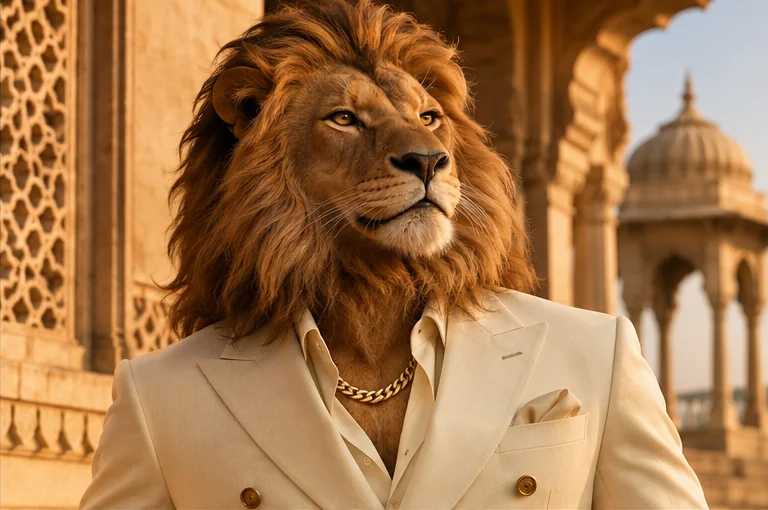
Describe the character first
Open with the subject: a fictional anthropomorphic Asiatic lion with a tawny mane and amber eyes. Ask for a chest-up fashion portrait with one gold chain and a tailored suit. Put the subject and framing first so the generator has a clear composition before it reads materials and lighting.
Set the light and wardrobe
For a classic look, pair a black suit and an open collar with amber rim light on the mane. For a warmer picture, specify a cream double-breasted jacket and sandstone arches in late-afternoon light. Let the chain sit against the shirt or lapels, with enough contrast that it reads at profile-picture size.
Choose the right crop
For a profile photo, use a 1:1 image with both ears and the eyes safely inside the middle of the frame. For a phone wallpaper, choose 9:16 and ask for space above the mane so the lock-screen clock has room. Match the crop in the generator’s aspect-ratio settings when available.
Use a reference image
If your generator supports image editing, upload a photo you own or have permission to use. Describe which elements it should keep, such as pose, framing or background. Then specify the lion’s face, mane, suit and chain. Submit the image directly to your generator and review its data policy before sharing personal photos.
Refine one detail at a time
If the lion’s face is cropped, ask for more room above the mane and a wider frame. If the chain blends into the jacket, ask for a single clearly visible chain with subtle catches of light. Keep the rest of the prompt fixed so you can see what your change did. To compare lighting and clothes before writing your prompt, visit the Sheru Bhai photo gallery.